Mscgen
What is it?
Mscgen is a small program that parses Message Sequence Chart
descriptions and produces PNG, SVG, EPS or server side image maps (ismaps)
as the output. Message Sequence Charts (MSCs) are a way of representing entities
and interactions over some time period and are often used in combination
with SDL. MSCs are popular in Telecoms to specify how protocols operate
although MSCs need not be complicated to create or use. Mscgen aims to
provide a simple text language that is clear to create, edit and
understand, which can also be transformed into common image formats for
display or printing.
This program and the language it parses have been inspired by
Graphviz Dot,
which provides a really good way to document State Transition Diagrams,
data structures and directed graphs. Unlike Graphviz, this program does no
clever layout operations or spline routing as this is not needed for MSCs,
and so was much simpler to implement. Doxygen
(version 1.5.2 onwards) also allows MSCs to be embedded directly in the same way
that dot diagrams can be added to documentation, making it easy to improve
Doxygen generated documentation through the use of message sequence charts.
Examples
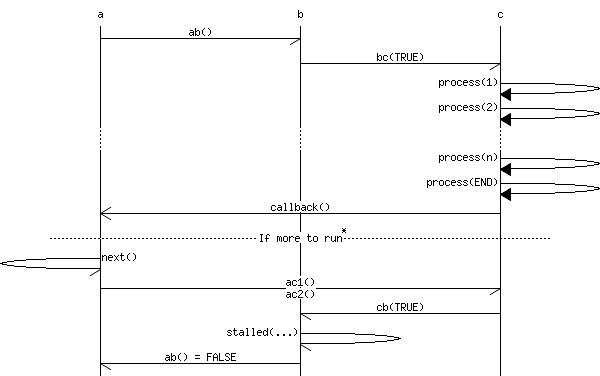
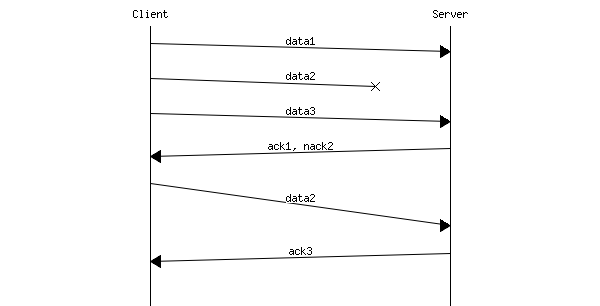
The following are examples of the raw input code and output
that is generated, in this case as a PNG.
# MSC for some fictional process
msc {
  hscale = "2";

  a,b,c;

  a->b [ label = "ab()" ] ;
  b->c [ label = "bc(TRUE)"];
  c=>c [ label = "process(1)" ];
  c=>c [ label = "process(2)" ];
  ...;
  c=>c [ label = "process(n)" ];
  c=>c [ label = "process(END)" ];
  a<<=c [ label = "callback()"];
  ---  [ label = "If more to run", ID="*" ];
  a->a [ label = "next()"];
  a->c [ label = "ac1()\nac2()"];
  b<-c [ label = "cb(TRUE)"];
  b->b [ label = "stalled(...)"];
  a<-b [ label = "ab() = FALSE"];
}
|
|
# Fictional client-server protocol
msc {
 arcgradient = 8;

 a [label="Client"],b [label="Server"];

 a=>b [label="data1"];
 a-xb [label="data2"];
 a=>b [label="data3"];
 a<=b [label="ack1, nack2"];
 a=>b [label="data2", arcskip="1"];
 |||;
 a<=b [label="ack3"];
 |||;
}
|
|
Description of Mscgen Language
The general format for a message sequence chart is given by the following
annotated example. It should be noted that whitespace and newlines are
ignored by the input parser.
| Input fragment |
Meaning |
# MSC for some fictional process |
Comment. Lines starting with # or // are
ignored, as a C-style comments wrapped in /* and */ |
msc { |
Starts the MSC |
width = "800"; |
Output control options, in this case, set the output image width to 800 pixels.
Note that the hscale option could be used to specify a scale factor
for the width instead of an absolute, if preferred. |
a, b, "c"; |
Lists the entities that will be used in the message sequence chart,
in the order in which they should appear left to right and horizontally
across the page. Note that each entity name can or may not be quoted,
unless the name is to include a space, in which case double quotes are
required. |
a->b |
Indicates that some message is passed from a to b. Both of the named
entities, in this case a and b must have been
declared at the start of the message sequence chart. Again, if an
entity name contains spaces, double quotes should be used. |
a<-c [label="return"]; |
Indicates that some message is passed from c to a. In this case some
attributes are also supplied in square brackets. The label
attribute supplies text that is written above the message arc. |
} |
This shows the end of the Message Sequence Chart |
The syntax is very simple. The important part to notice is that the first
lines give the message sequence chart options and entities, with each of the
following lines describing a message arc. The following table shows each of
the possible message arc types, including the so-called 'special' arcs that do
not show a relation between entities but instead describe something
horizontally on the chart.
| Graphic |
Source Representation |
Meaning |
 |
-> or <- |
Message |
 |
=> or <= |
Method or function call |
 |
>> or << |
Method or function return value |
 |
=>> or <<= |
Callback |
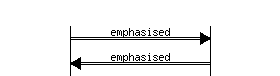 |
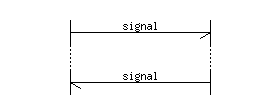
:> or <: |
Emphasised Message |
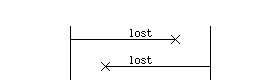 |
-x or x- |
Lost Message |
 |
... |
Indicates that some signals may be deliberately omitted
from the msc, or that some large period of time may have passed. |
 |
--- |
Used to add comment to a block of signals or indicate some
action or state has occurred. |
 |
||| |
Used to add extra space between rows. |
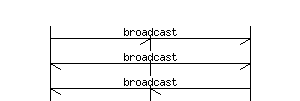 |
->* or *<- |
Broadcast arcs, where the arc is extended to all but the source
entity. Any arc label is centred across the whole chart. |
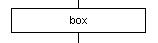 |
box |
Box arcs, where the arc is replaced with a box between the selected
entities. Any arc label is centred in the box and word
wrapped if needed. |
 |
rbox |
Rounded box arcs, where the arc is replaced with a box between the
selected entities. Any arc label is centred in the box and word
wrapped if needed. |
 |
abox |
Angular box arcs, where the arc is replaced with a box between the
selected entities. Any arc label is centred in the box and word
wrapped if needed. |
 |
note |
Note box arcs, where the arc is replaced with a box between the
selected entities. Any arc label is centred in the box and word
wrapped if needed. |
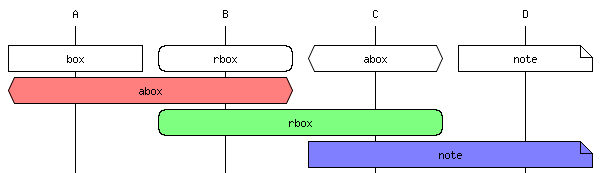
The box types allow state and condition boxes to be added. In the source
these are still represented as a relation between entities, but in this case
the box is made to span from the source to the destination entitiy.
# Example MSC using boxes

msc {

   # The entities
   A, B, C, D;

   # Small gap before the boxes
   |||;

   # Next four on same line due to ','
   A box A [label="box"],
   B rbox B [label="rbox"],
   C abox C [label="abox"],
   D note D [label="note"];

   # Example of the boxes with filled backgrounds
   A abox B [label="abox", textbgcolour="#ff7f7f"];
   B rbox C [label="rbox", textbgcolour="#7fff7f"];
   C note D [label="note", textbgcolour="#7f7fff"];
}
|
|
In addition to the arc types, a small number of attributes can be given to
each message arc or entity. These attributes are placed in square brackets
as a coma separated immediately after the entity name or message arc to which
the attribute is to be attached:
a->b [label="A to B", textcolour="red", linecolour="#ffb011"];
The following table describes all of the possible attributes and their meaning,
noting that each of the attributes can be specified for the special '...' and
'---' arc types, as well as any other arc or entity.
| Source Attribute |
Meaning |
| label |
A label to place on the message arc, or label to use for an entity.
This is reproduced literally above the message arc or in place of the
entity name. When used as a message arc label this may also contain
parameters or required text. If a \n is encountered, it
will be interpreted as a newline, placing text below the arc as well
as above it in the normal position, or expanding entity tiles onto more
lines. |
| URL |
When generating the image, colour the label in blue. If generating an
image map, create an entry for the label to the specified URL. If the
message sequence chart is to be embedded in Doxygen documentation, the
URL maybe specified as \ref xxx where xxx is
the name of some documented element; in this case a link to the element
will automatically be made. |
| ID |
Adds a superscript identifier to the label. Typically this maybe a
number such that specific elements can be identified and referred to
in surrounding descriptive text. |
| IDURL |
Similar to the URL attribute, but links from the ID text rather than the
message label. This has the same semantics as the URL attribute, but is
only of use if an arc also has an ID. |
| arcskip |
This offsets the vertical position at which an arc reaches its destination
entity. |
| linecolour, linecolor |
For arcs or entities, set the line to the specified colour. |
| textcolour, textcolor |
For arcs or entities, set label text to the specified colour. |
| textbgcolour, textbgcolor |
For arcs or entities, set a colour for the text background block.
Sets the fill colour for 'box', 'abox', 'rbox' and 'note' shapes. |
| arclinecolour, arclinecolor |
Only meaningful on a entity, this sets the default line colour for all
arcs that originating from that entity. This can be overridden by
linecolour attributes on specific arcs as desired. |
| arctextcolour, arctextcolor |
Only meaningful on a entity, this sets the default text colour for all
arcs that originating from that entity. This can be overridden by
textcolour attributes on specific arcs as desired. |
| arctextbgcolour, arctextbgcolor |
Only meaningful on a entity, this sets the default colour for the text
background for all arc oriniationg from that entity. This can be
overridden by textbgcolour attributes on specific arcs as desired.
|
Colours can be specified either as RGB colour codes using a # prefix as per
HTML markup, or can use one of some predefined colour names as given in the
following examples.
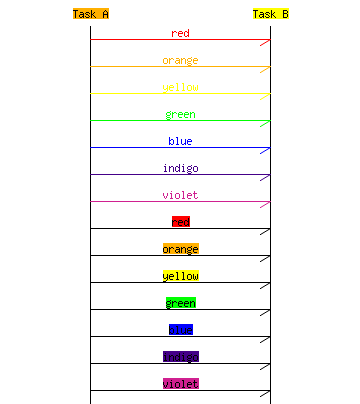
|
| Name |
Code |
Block |
| white | #ffffff | |
| silver | #c0c0c0 | |
| gray | #808080 | |
| black | #000000 | |
| maroon | #800000 | |
| red | #ff0000 | |
| orange | #ffb000 | |
| yellow | #ffff00 | |
| olive | #808000 | |
| green/lime | #00ff00 | |
| aqua | #00ffff | |
| teal | #008080 | |
| blue | #0000ff | |
| navy | #000080 | |
| indigo | #440088 | |
| purple | #800080 | |
| violet | #d02090 | |
| fuchsia | #ff00ff | |
|
Finally options can be added to the input file to control various aspects of
the generated image. At present only a few options are supported and must be
given at the top of the input file as in the following example. The allowable
options are described in the table.
msc {
   # Options section
   hscale="1.5", arcgradient="5";

   # Entities
   A, B;

   # Arcs
   A -> B;
}
| Option |
Meaning |
| hscale |
Scale the image width by this factor, which must be a non-zero value.
Normally the output width is 600 pixels for a PNG, but can be scaled to
any value by specifying fractional multipliers. For example, specifying
a value of 1.5 would set the width to 600 x 1.5 = 900 pixels.
|
| width |
Set the image width to this values, which must be non-zero and is given
in pixels. This can be used instead of the hscale option, in cases where
the explicit image width is preferred to a scale factor.
|
| arcgradient |
This causes message arcs to slope down the page rather than running
horizontally. The value given is the number of pixels below the
start of the message arc that the end of the arc should meet the target
entity.
|
| wordwraparcs |
If set to 'true', 'on' or '1', this will cause long lines of text on
arrow arcs to be automatically word wrapped. By default word wrapping
is only enabled for 'box', 'abox', 'rbox' and 'note' style arcs.
|
The grammar for the mscgen language can be seen here.
The Software
Mscgen is licenced under the GPLv2. This
covers use of the program sources but places no restriction on the usage of the
tool itself or the diagrams it produces. Mscgen is written in ANSI-C, and uses
the GD graphics library for PNG output.
Mscgen can be built under Linux, Cygwin, and as a native Win32 application
through Cygwin with the wonderful -mno-cygwin compile option. Since
version 0.17 it uses autoconf/automake, so should be reasonably automatic in
building provided that the dependent packages (gcc, flex, bison, libgd-devel)
are avaialble. Others have previously reported success building the sources
SunOS 5.8, Solaris 10, FreeBSD as well as Mac OS X.
Downloads
The current version is 0.20 (changelog).
The latest version of the software can be downloaded from the following links:
RPMs and Yum
RPMs built for various Fedora versions and EPEL are available at http://www.mcternan.me.uk/mscgen/yum/.
You can either install these RPMs directly, or you can install a repository for getting mscgen and future updates:
# On Fedora
$ sudo wget -O /etc/yum.repos.d/mscgen.repo http://www.mcternan.co.uk/mscgen/yum/fedora/mscgen.repo

# On EPEL i.e. RedHat Enterprise Linux, CentOS, Scientific Linux etc..
$ sudo wget -O /etc/yum.repos.d/mscgen.repo http://www.mcternan.co.uk/mscgen/yum/epel/mscgen.repo

# Then install mscgen from the repository
$ sudo yum install mscgen
Fedora RPMs are signed with my public key,
and yum should prompt you to import this key once the repo is installed. Because
of differences in signing for EPEL and Fedora, the EPEL packages are not currently signed.
Development Sources
The development sources are also available on Google Code,
and can be browsed online
or retrieved using anonymous SVN access.
New releases are announced via a Google Groups announcement mailing list.
This carries only release announcements and you can subscribe through the following
form:
Bugs
Bugs, patches, and suggestions can either be emailed directly to
me, or entered into the
Google Code issue tracker.
Since this is hobby project it can take a long time for me to respond, but I try
to review every patch and respond to all emails.
Doxygen Integration
Initially I made custom modifications to
Doxygen such that it could
call other tools in response to a new command keyword. In response to this
Doxygen version 1.5.2 (released 4-4-2007) was enhanced by Dimitri to support the
\msc and \endmsc commands. This means that the
following markup can be used to add MSCs to Doxygen documentation:
/** Request a fandango on core.
 * Sending this signal to the Iberian dance task will cause it to create a
 * wild pointer which is then used to corrupt the malloc arena leading to
 * mysterious failures later on in the program execution.
 *
 *\msc
 *  T,"Iberian Dance Task";
 *
 *  T->"Iberian Dance Task" [label="IbFandangoReq", URL="\ref IbFandangoReq"];
 *  T<<"Iberian Dance Task" [label="IbFandangoCnf", URL="\ref IbFandangoCnf", ID="1"];
 *\endmsc
 *
 * <OL>
 * <LI>In some cases, the system may have failed before this signal is sent
 *     or received, in which case the confirm maybe lost.
 * </OL>
 */
typedef struct IbFandangoReqTag
{
  TaskId reqTaskId;
}
IbFandangoReq;
The output from this sample can be seen
here. Another example of using this
command is also given in the
Doxygen manual.
Contributions
Install Packages
Some kind people have packaged Mscgen for a couple of Linux distributions and environments:
Integration with other Tools
- AsciiDoc
Henrik Maier has kindly developed a filter for Mscgen at http://code.google.com/p/asciidoc-mscgen-filter/.
- Doxygen
Supported by the \msc and \endmsc tags since Doxygen version 1.5.2.
- Sphinx (Python documentation generator)
Leandro Lucarella has contributed an extension for Sphinx to allow MSCs to
be included in Python documentation. This package can be found at
http://pypi.python.org/pypi/sphinxcontrib-mscgen.
- Msctexen (LaTeX Integration)
Andrzej Lichnerowicz has produced a package to allow inlining of mscgen MSCs within LaTeX documents. The project is open source and hosted at github.
- Org-Mode (an Emacs Mode for Notes, Project Planning, and Authoring).
This Babel package includes support for Mscgen graphs, see
their documentation for details.
- Pkgsrc
Jan Danielsson has kindly added Mscgen to pkgsrc.
- TWiki
Antti Haapakangas has created a plugin for TWiki to allow embedding of MSCs.
- JIRA
Addteq kindly produced a plugin for JIRA which is available at the Atlassian marketplace.
This page is maintained by
Michael McTernan